Short answer: This page helps you get unstuck on Sumbreak.online practice and daily-style boards. It does not post today’s LinkedIn Sumbreak answer or spoilers for LinkedIn’s official daily puzzle. For the official product, visit linkedin.com/games/sumbreak.
People searching for “Sumbreak hints” or “Sumbreak answer” usually want one of three things: (1) a playable board right now, (2) a gentle nudge when the grid looks dead, or (3) today’s official LinkedIn solution. This site can help with (1) and (2). It cannot honestly provide (3), because LinkedIn’s daily file is not available to embed or scrape here.
What a hint means on this board
Inside the Sumbreak embed on the home page, Hint outlines one legal pair—two identical numbers that share an edge. It does not solve the whole board. Use it when you have scanned for thirty seconds and still miss an adjacency, especially after empties rearrange the neighborhood.
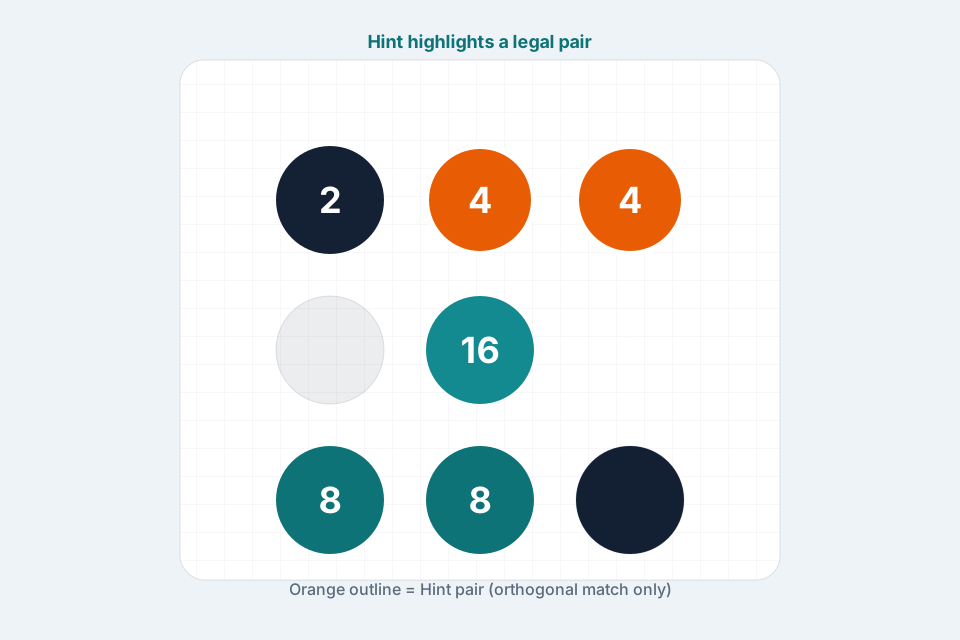
Five stuck-board checks (before you tap Hint)
- Same number, shared edge? Corner-touching matches are illegal.
- Did the last empty split a pair? Undo once and try landing the sum on the other square.
- Is there a forced small pair? Tiny matches are often the only safe move.
- Is the peak isolated? Build its twin beside it instead of merging elsewhere.
- Are you out of legal moves? Look for Last good move rather than random taps.
When the board is truly dead
If no identical edge neighbors remain, the puzzle is stuck. On this site:
- Last good move restores the board from just before the dead-end.
- Undo steps back one merge at a time.
- Reset restarts the current mode (Daily keeps the same date seed after reset on that day).
Hint will not help on a dead board—there is no legal pair left to outline.
Daily vs Practice when you want hints
- Use Daily when you want one focused board keyed to today’s local date.
- Switch to Practice when you want unlimited solvable boards to drill the same stuck patterns.
- Use Warm-up if you are still learning tap-to-merge.
Progress can save in browser player storage. Clearing site data clears saves.
Honest policy on “today’s answer”
| Request | What we offer |
|---|---|
| Play Sumbreak free in browser | Yes — Play Sumbreak |
| Strategy / unstuck hints | Yes — this page + tips |
| Rules walkthrough | Yes — how to play |
| LinkedIn official daily spoilers | No — not available; use LinkedIn Games |
Publishing a fake “today’s LinkedIn answer” would mislead players and violate the site’s rule that every sentence must be true. If you arrived from a search for answers, use the strategy above on a practice board, or open the official daily on LinkedIn.
Soft hint ladder (try in order)
- Scan for any matching edge pair without tools.
- Mentally mark empties as walls; ask which sum placement avoids a split.
- Undo 1–2 moves if the last empty looks wrong.
- Press Hint once; explain why that pair is legal.
- If dead, Last good move, then resume from step 1.
- Still learning? Read Sumbreak tips and retry on Practice.
Mobile hint habits
On a phone, selection is clearer with tap-tap than with long drags. After Hint outlines a pair, tap the first highlighted tile, then the second. Fullscreen from the home toolbar keeps the grid readable.
Keep the topic concentrated
This hints page exists so the home page can stay focused on playing Sumbreak while searchers who want unstuck help land on a dedicated long-tail URL. Cross-links:
- Rules → /how-to-play-sumbreak
- Strategy depth → /sumbreak-tips
- Play now → /
Ready? Open the board, try the soft hint ladder, and only then lean on the in-game Hint button.